
Auction Design
Auction Design uses a runtime-style Layout so the mechanism can be configured in the same visual context participants will see.
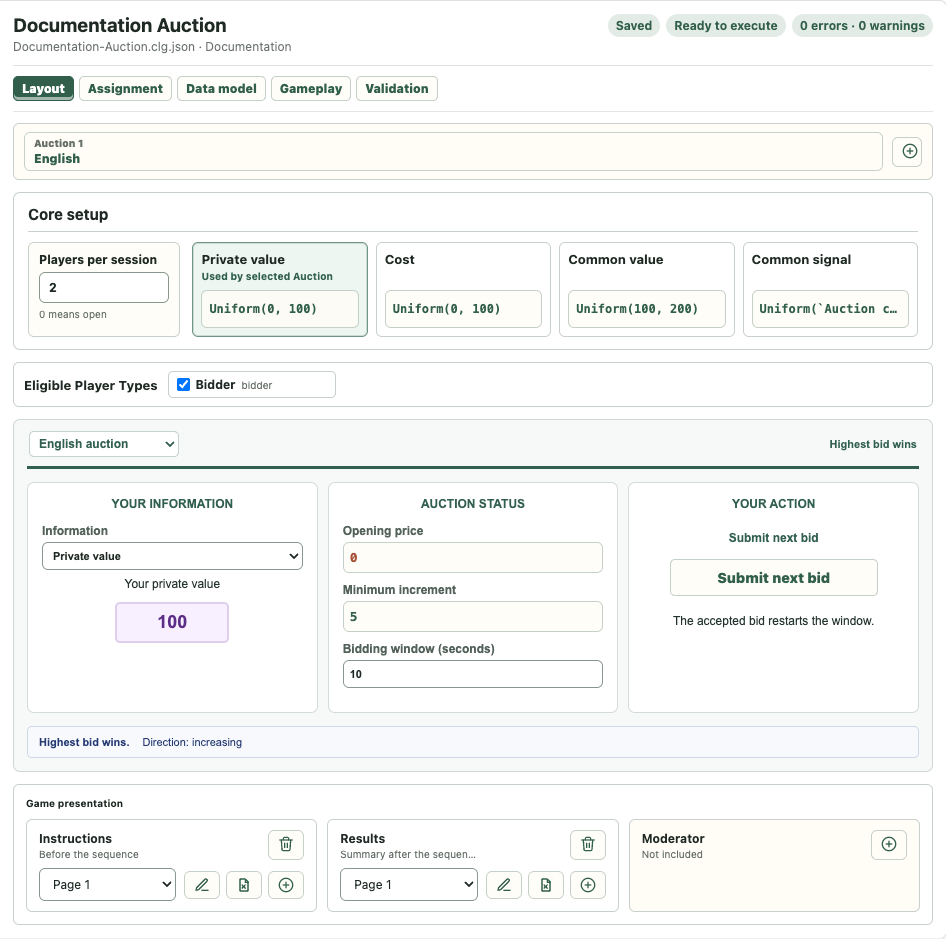
Create An Auction
Create a new Auction game, then work from left to right:
- Set the participant count and information formulas in Core setup.
- Choose the auction mechanism in Layout.
- Configure the information type, settlement, timing, and price rules.
- Review Player Types in Assignment.
- Review generated Variables in Data model.
- Edit Instructions, Results, and Moderator presentation in Game presentation.
- Resolve Validation errors, save, and start the game from Execution.
Auction Mechanisms
The editor supports the mature Auction variants:
- Sealed bid, including first-price and second-price settlement.
- English, with opening price, minimum increment, and bidding window.
- Dutch, with opening price, price step, and step interval.
Information can be based on private value, common-value signal, or cost. The visible formulas in Core setup are editable formula fields, not fixed explanatory text.
Auction Sequence
A game can contain one or two Auctions. When a second Auction is added, the sequence appears across the top of Layout and can include one optional Between auctions Stage. The Stage is only between the two Auctions; Instructions already precede the sequence and Results follow it.
Use the sequence controls to select an Auction, reverse their order, remove one, or add/edit the between-auction Stage.
Eligible Player Types is a separate configuration band. It determines which assigned types participate in the selected Auction and is not part of the Page Audience mechanism.
Automatic Defaults
New Auctions receive mechanism-appropriate defaults for information, prices, Instructions, and Results. Some formula and Stage fields remain template-managed until you edit them. Changing a related mechanism or information setting updates only content that is still marked as unedited.
Once you edit template-managed content, later setting changes preserve your text or formula.
Instructions, Between Stage, And Results
Auction Instructions describe every Auction in sequence and include the relevant information formulas. Common-value signal Instructions include both the signal formula and common-value formula.
The optional between-auction Stage may repeat the participant's information and submitted action from the first Auction, but should not reveal results that are not yet public.
Results contain participant results for each Auction and a summary for all players. For common-value Auctions, Results include the realized common value because it is the basis of profit.
Game presentation uses the same three-column Stage cards and Page editor in Layout and Gameplay. Audience rules determine which Player Types receive each Page.
Data Model
Auction modules generate stable Variables for current price, submitted action, winner, clearing price, completion, sale state, and profit. Two Auctions receive distinct identities and readable labels such as Auction 1 and Auction 2.
Generated definitions are available in the Page variable inserter. User-created Variables remain independent unless a formula or value source explicitly updates them.
Pre-Run Check
Before execution, confirm:
- the participant count matches Assignment,
- every Auction has an eligible Player Type,
- comparison settings are compatible when the selected sequence requires them,
- required prices and intervals are valid,
- Instructions and Results reference Variables from the intended Auction,
- Validation contains no errors.
For field-by-field mechanism, information, sequence, and eligibility behavior, see Auction Settings Reference.