
Market Game Design
Market Layout mirrors the player dashboard. Click a visible segment to edit the settings that produce it. The active segment is highlighted in the preview, and its editor appears below.
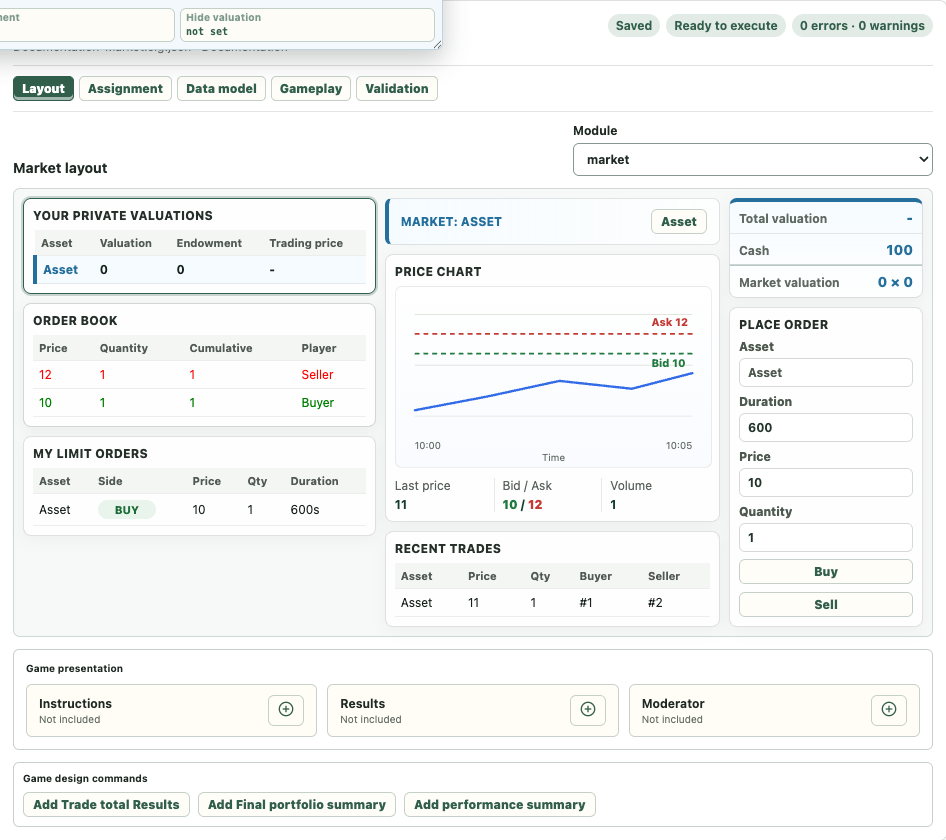
Layout Segments
The main preview includes:
- Total valuation, Cash, and selected-market valuation,
- Your Private Valuations,
- Order Book,
- My Limit Orders,
- Market selector and Price Chart,
- Recent Trades,
- Place Order.
Clicking a segment selects its editor. Asset names inside Your Private Valuations select the segment for editing; use the Market or Trader selectors in the editor when you need to change the active asset or Player Type.
Assets
Add assets in the Market editor. A newly added asset is selected immediately so its name can be edited. Press Enter to confirm the name; the Layout, market selector, and Trader settings update together.
Use the move controls to change asset order. Asset identity remains stable even when its display name or position changes.
Market Assets are tradable instruments. They are distinct from presentation Images, which are managed under Data model and can be inserted into Pages.
Player Type Accounts
Each Player Type account defines initial cash and per-asset policy. The Market view includes valuation, endowment, allowed order types, price and quantity limits, and transaction outputs.
The account tabs separate:
- Market settings,
- Transaction outputs written when a trade occurs,
- View history data with Variables used for historical presentation.
Orders And Time
Order permissions control limit, market, and select Buy/Sell actions. Duration is shown only when it has meaning for the configured Market timing.
A Periodic transition performs repeated updates. If no explicit periodic transition exists, imported legacy Market definitions retain the established default cadence. In a new explicit periodic transition, duration must be positive; an omitted duration uses the default interval.
Data Model And Value Sources
Market Data model Variables can be placed into initialization, Stage entry, transition, periodic transition, or transaction output locations. The value-source dialog asks for the required Player Type, asset, or transition when a destination is ambiguous.
Creating a Variable from a Page and assigning its source is a shortcut into the same canonical structures shown in Gameplay. It does not create a separate execution mechanism.
Game Presentation
Market games can add Instructions, Results, and Moderator Stages. Unlike Auction Design, new Market games do not automatically create them. Adding a new Page uses the latest template for that Stage type; current Market templates may be empty.
High-level presentation commands can materialize related Variables, formulas, and Pages, including trade-total, final-portfolio, and performance summaries. Generated elements are marked by provenance so their origin is visible.
The Instructions, Results, and Moderator cards use the shared three-column Game presentation layout in both Layout and Gameplay.
See Market Design Commands Reference for the exact generated Variables, outputs, presentation tables, states, Repair behavior, and removal boundary.
For every Gameplay field and its corresponding Layout segment, see Market Settings Reference.
Pre-Run Check
Before execution, confirm:
- at least one asset and Player Type account exist,
- valuation and endowment formulas have the intended scope,
- Buy/Sell permissions and limits are correct,
- transaction outputs target the correct Variables,
- periodic transitions have a valid interval,
- Instructions and Results only reference values available at their Stage,
- Validation contains no errors.