
Strategic Game Design
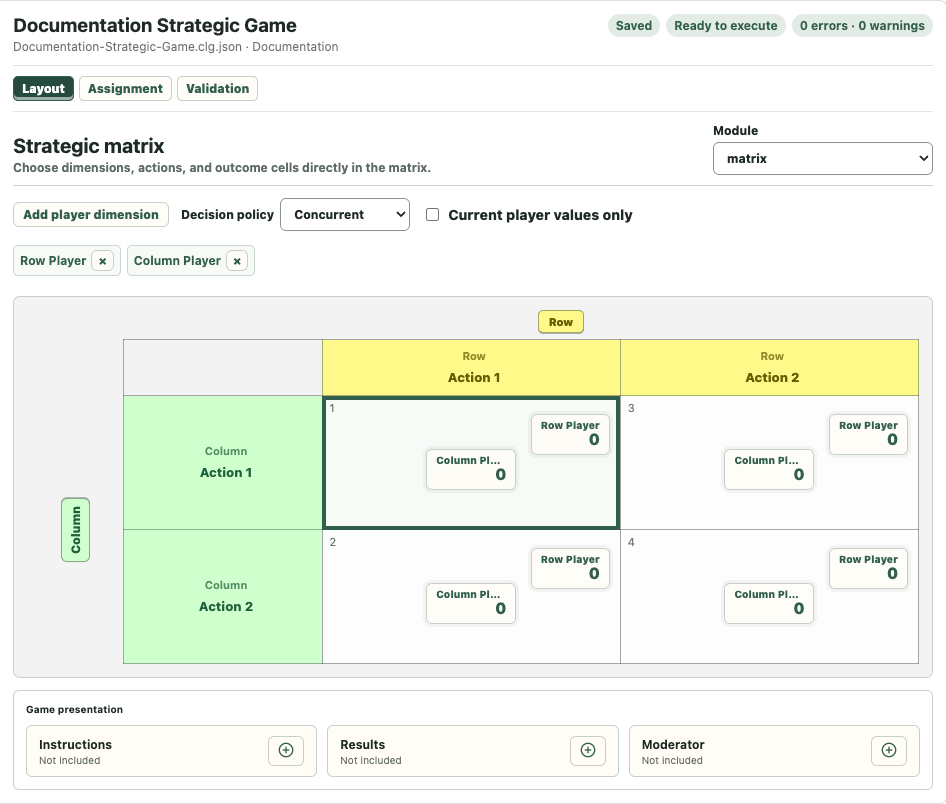
Strategic Design edits the payoff matrix directly. The Layout is the primary editor and stays synchronized with Assignment.
Assignment First
Use Assignment to add Player Types and Players, set the number of participants, and define rounds and randomization. Strategic actors and payoff recipients are drawn from this assignment.
Changing a Player Type name updates the author-facing matrix labels while stable identity keeps formulas and references attached.
Matrix Layout
The Layout shows decision dimensions, actions, and outcome cells. Select an actor or action label to edit it directly. Select a payoff value in a cell to open the formula editor.
The matrix expands when actions or dimensions are added and preserves existing outcome-cell identity and formulas where the structural change is unambiguous.
Decision Policy
- Concurrent: the participating actors choose without seeing the other choices for that decision.
- Sequential: actors choose in the configured order.
The runtime uses the same canonical matrix definition shown in Layout.
Payoff Recipients
Every outcome cell uses the same ordered recipient list. Adding a recipient appends a payoff entry to every cell. Removing a recipient removes that position consistently.
Each payoff is a formula, so it may use constants or references available in the game definition. A minimal matrix should have a payoff formula for each intended recipient in every reachable cell.
Structural Editing
When adding or removing actions, review all affected cells. The editor preserves values when coordinates still correspond clearly and refuses ambiguous transformations rather than silently moving payoffs.
Game Presentation
Instructions, Results, and Moderator content use the shared three-column Game presentation editor. Their Pages, Audience rules, Variables, Choices, and Images behave like Pages in the other game types.
Pre-Run Check
Before execution, confirm:
- Assignment contains all actors used by the matrix,
- every decision dimension has the intended actions,
- concurrent or sequential policy is correct,
- every outcome cell has the expected payoff recipients and formulas,
- Validation contains no errors.
For dimensions, Action values, outcome coordinates, recipient synchronization, and structural preservation, see Strategic Form Settings Reference.